Lumick: From Elementor to Native Gutenberg Blocks, Same Design and SEO
Lumick, a Dutch company, makes LED photo ceilings and photo walls (“Create your own sky”) for hospitals, dental practices, schools, offices and wellness venues. Its website ran on Elementor with four add-on packs and 21 active plugins. The job was to remove all of that without visitors, or Google, noticing anything except a lighter site.
At a glance
| Site | lumick.com |
|---|---|
| Before | WordPress with Elementor Pro, four add-on packs (ElementsKit Lite, Jeg Kit, Themesflat Addons and Envato Elements) and 21 active plugins |
| Built with | Custom native Gutenberg blocks on one design system, a clean theme with no styles or scripts of its own, no page builder |
| Carried over | 19 pages on their original Dutch addresses, with their SEO titles, descriptions and share tags; the HubSpot, Leadinfo and CookieYes scripts on the same accounts; plus a new branded 404 page |
| Custom blocks | 33, including the header and footer |
| Plugins | 4 instead of 21: Fabrement, Yoast SEO, Wordfence and WPCode |
| Subscriptions | 3 paid subscriptions cancelled: Elementor Pro, Envato Elements and Jetpack |
| Fidelity | Every page within 3 px of the original on desktop, measured at 1440 and 390 px |
| Language | Dutch only |
| Time | 10 hours of work, with 3 meetings with the client |
| Agent | Claude connected over MCP, with Fabrement 1.4.0 |
| Do it yourself | Step-by-step: Elementor to Gutenberg with your AI agent |
| Full report | Download the technical case study (PDF), written by the AI agent that built the site |
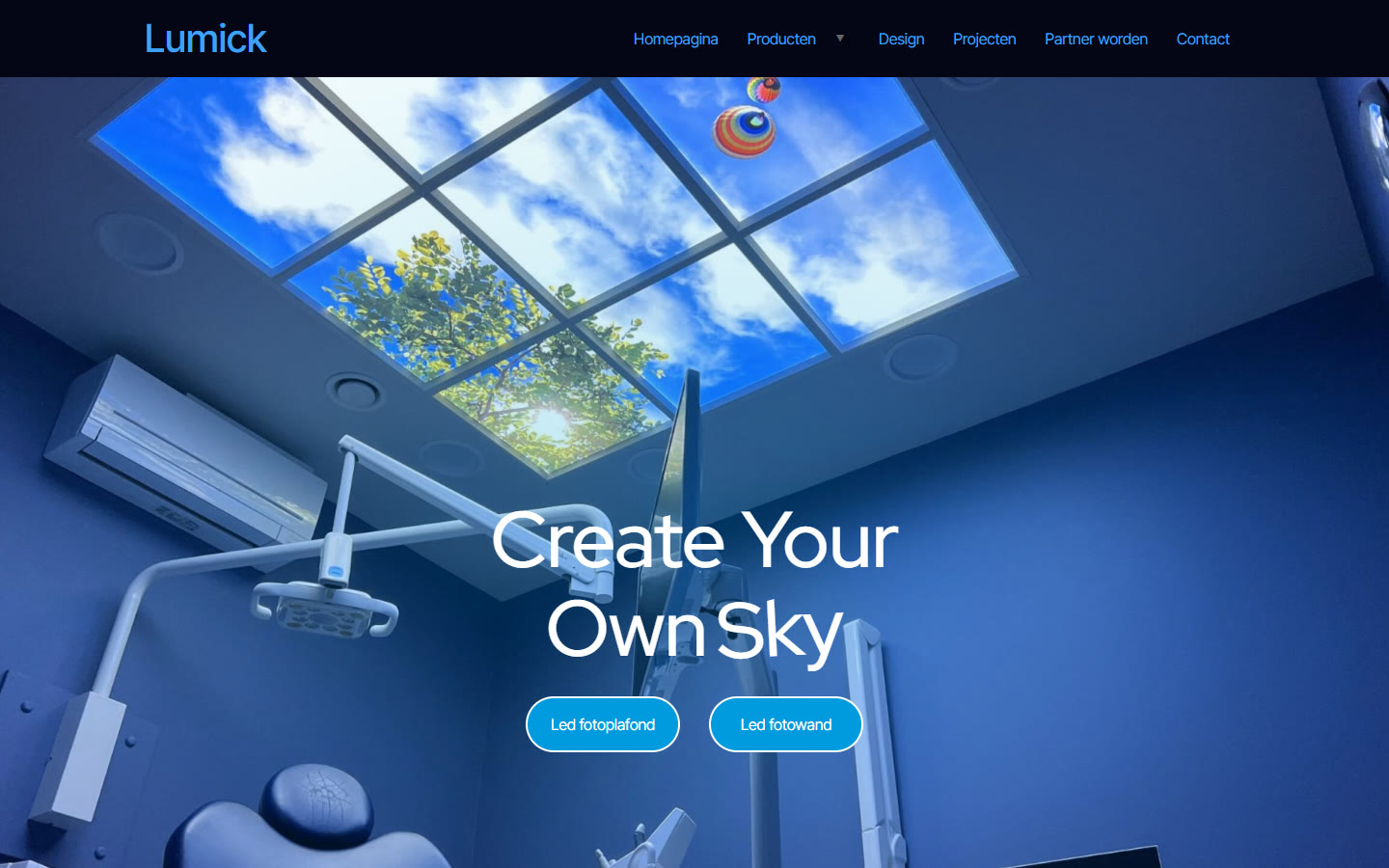
The brief: change everything underneath, nothing on top
The brief to the agent was one paragraph: the design stays the same, every button behaves the same, all spacing stays the same, and all SEO metadata moves across. Before rebuilding anything, the agent had to check the live site and say what it understood. It audited the site first, read-only, and nothing on the live site changed until it was asked to.
A clean start
The agent installed a simple theme with no styles and no scripts of its own, so nothing from the old setup could leak into the new pages. Every section of the Elementor design then became its own native Gutenberg block on one design system, with fields the team edits in the block editor.
Homepage first, then the rest
The homepage came first, compared with the original section by section. The details that needed fixing were the kind an agent can miss and a person spots at once: a menu hover that behaved differently, and a footer submenu. Once the homepage matched, the agent built the other 18 pages the same way and reported back with the decisions it needed from us.
Nothing left behind
The review compared the two page lists, old and new, so no page went missing; the two default pages WordPress creates were deleted. Each page kept its SEO title and description word for word. The agent also asked about the page everyone forgets, the 404, and rebuilt it in Dutch. The tracking scripts moved across: HubSpot, Leadinfo and the cookie banner. A last pass at every screen width caught the rest, including a heading that touched the edge on a narrow screen, and the agent flagged issues of its own too.
What took the time
Most of the time went into details the old site never showed on the surface. The agent that built the site kept a list of them. A few:
- Text looked bolder than the original on a Mac. The old theme switched on font smoothing for the whole page, so the same rule went into the new site.
- Submenus on phones could not be opened. Each parent item got its own tap target, and the menu panel now scrolls on its own without moving the page.
- Eight pages lost their share description. The old site relied on WordPress auto-excerpts, which blocks do not produce, so the exact texts were entered by hand, without adding a meta description the original never had.
- One share image was in AVIF, a format Yoast does not output. It was saved again as a JPG.
- The order form’s buttons overflowed on phones. Below 768 px they now share the row equally.
Lumick’s verdict on the finished site was two words: “Looks good.” For a rebuild meant to change nothing a visitor can see, that is exactly the review we were hoping for.
How the owner edits it now
Every section is a block with fields. To change a photo or a headline, the owner opens the block, clicks Edit content, swaps the image or types the new text, and saves. Or asks the agent to do it, over the same MCP connection.
Do it yourself
Hand this to your AI first: fabrement.com/AGENTS.md. One link, and your agent knows what Fabrement can do on your site and how to connect to it.
The steps for your own site are in our guide How to Move an Elementor Site to Gutenberg, and how the two editors compare is on Elementor vs Gutenberg. Another Elementor site we moved is in the Cowboy Productions case study.
Shown with the permission of Lumick.
Related articles

Cowboy Productions: From a Lovable Design to WordPress in 12 Hours
Cowboy Productions had an Elementor site and a new design made in Lovable. In 12 hours it became a WordPress site built…

A Multilingual WordPress Site Its Owners Run with an AI Agent
A four-language WordPress site rebuilt on its existing design, with an architecture built for one goal: the owners run it themselves through…

Why Some Standards Survive and Others Don’t
I lost most of the team standards I tried to keep across three teams. Two held for eight years. What saved them…